
Asset management in higher education is evolving from basic inventory tracking into a coordinated system that unites physical devices, cloud infrastructure, and SaaS tools.
As hybrid learning expands and IT networks grow, controlling costs, protecting data, and optimizing operations have become increasingly critical. This guide explores strategies for transforming campus asset management in 2026 and beyond.
TL;DR
- Universities now manage thousands of devices and more than 170 SaaS platforms per institution, yet only 25% utilize structured systems for university asset tracking, creating significant gaps in visibility and control.
- Treating digital and physical assets separately leads to duplication of software licenses and device records, resulting in data loss and higher administrative costs.
- Unified asset management integrates smart lockers, SaaS tracking, and analytics for real-time supervision, stronger budgeting, and more efficient service delivery.
- ForwardPass smart lockers reduce manual device handoffs through self-service workflows. Configured webhook connections can keep asset records, support tickets, and operational notifications linked to locker activity.
Why asset management is crucial for universities
Universities manage an increasingly complex mix of hardware and software. On average, institutions run more than 170 SaaS applications and maintain thousands of physical devices for students, faculty, and administrative staff.
With over 76% of students using laptops as their primary academic devices, the availability, uptime, and security of these devices have become crucial to learning success. Yet in most institutions, asset management is fragmented, reactive, and inefficient.
Key challenges span both digital and physical environments:
- Only 25% of institutions have a structured software asset management program (SAM), leaving many without a clear view of usage, access, or renewal cycles.
- IT teams lack tools to monitor the physical location, condition, or assigned ownership of shared devices such as tablets, laptops, and lab equipment.
- Approximately 10% of laptops are lost or stolen, with nearly 50% of the incidents occurring in offices or classrooms. Approximately 98% of stolen devices are never recovered.
- Redundant licenses, idle accounts, unmanaged integrations, and rising security risks continue to inflate costs and strain IT resources.
The two sides of asset management in higher education
Most universities approach asset management through two distinct channels: physical asset management and digital asset management.
Physical asset management in higher education
Physical asset management refers to the management of tangible assets, including laptops, tablets, lab equipment, and audiovisual systems. In most universities, this process is still manual or loosely structured.
IT teams typically use asset tags, basic inventory software, or spreadsheets to track devices, but often lack real-time location data, user history, or status updates. When a device is lost, stolen, or sits unused, the institution typically finds out too late — if at all.
Higher education digital asset management
Digital asset management spans cloud applications, software licenses, and user permissions. Departments often purchase and manage tools independently. This typically results in duplicated subscriptions, uneven renewal timelines, and unclear ownership — a persistent problem in SaaS management for education.
“In higher education institutions where separate colleges, schools, departments, or programs might be siloed from others, there may be similar or duplicate software programs installed on devices, which can cost the institution twice as much.”
— Edtech Magazine.
License usage is often unchecked, and access remains active long after students or staff depart. These gaps raise costs and expose institutions to higher security risk, with data breaches in education now averaging more than $3.8 million.
Prevalence of software asset management (SAM) tools in higher education
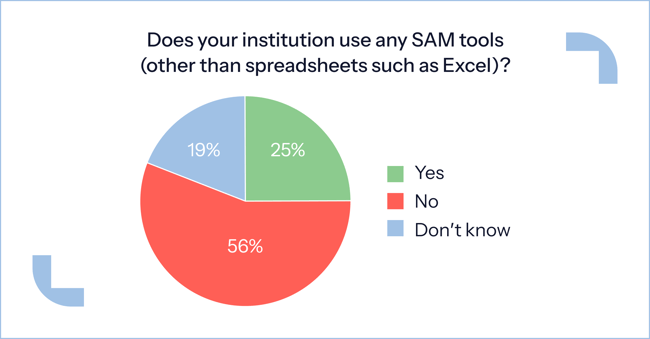
Source: EDUCAUSE QuickPoll Results
Why do these systems not work separately?
When handled separately, these systems fail to deliver a complete view of usage or compliance. A laptop may appear to be active in inventory yet run outdated or unlicensed software, or a paid license may still be assigned to a lost or idle device.
Such mismatches result in wasted spending, incomplete audits, and rising administrative costs, making it harder for universities to track performance and accountability in their technology investments.
Integrating digital and physical asset management — the future model
Universities are increasingly aiming to unify physical and digital asset management within a single, connected system. This transition aligns with broader future trends in education. It reflects growing recognition that devices and software function as two interdependent parts of one ecosystem — each essential for security, reliability, and consistent access.
To close this gap, many institutions are turning to smart locker systems, such as ForwardPass’s smart charging lockers. These systems integrate hardware supervision with digital automation, providing both visibility and control within a single environment.
Smart locker solutions offer tangible benefits for unified asset management:
- They automate device check-ins and check-outs to maintain precise records of who uses each device, when, and for how long.
- They simplify loaner workflows by allowing IT teams to assign and monitor temporary devices through built-in automation, minimizing repetitive tasks.
- They provide students and faculty with self-service access to retrieve, charge, or return devices securely without waiting for IT assistance.
- They combine digital management tools such as usage logs, access permissions, and real-time notifications, allowing administrators to track assets and activity from a single dashboard.
- Supported identity connections simplify sign-in, while configured webhooks let IT bring device handoff activity into existing asset records, support tickets, and notification processes.
ForwardPass customers report spending 80% less time on device management after adopting smart charging lockers, saving thousands of dollars annually and strengthening accountability, device uptime, and service quality across campus.
Best tools for physical and digital asset management for higher education: 2026 edition
The asset management industry for higher education provides diverse solutions that help institutions improve accountability, automate routine tasks, and maintain a unified, transparent view of their assets.
Smart lockers for campus device management — ForwardPass
ForwardPass smart lockers support device loans, deployments, returns, repairs, replacements, and charging. Students and faculty handle routine handoffs themselves, while IT manages access remotely and connects activity with existing campus systems.
Key capabilities include:
- User authentication: SSO through supported identity providers lets people use organizational credentials, with barcode, QR code, and RFID options also available.
- Remote management: The ForwardPass Portal gives IT visibility into device handoffs and control over users, bays, and workflows across locations.
- Operational notifications: Configured alerts help staff respond to overdue loans, reported device problems, and low device availability.
- Asset management connections: IT can update existing device records through configured webhooks, keeping borrowing and return history alongside campus inventory information.
- Ticketing connections: Webhooks can create or update support tickets from relevant locker events, bringing device issues and follow-up work into existing queues.
Best fit: Campus IT teams seeking to reduce manual device handoffs, support self-service access, and keep asset records and support processes connected.
Asset management software for higher education — InvGate, Jamf, and ManageEngine
InvGate and ManageEngine specialize in organizing and optimizing software licenses, cloud applications, and user access across departments, while Jamf focuses on managing and securing Apple devices within campus environments.
Digital asset management in higher education allows universities to maintain compliance, control costs, and gain visibility across their software ecosystems, as shown by these leading platforms:
- InvGate delivers SaaS visibility and cost optimization by centralizing software and license data, including contracts, renewals, and usage insights. This enables IT teams to identify redundant tools and reduce overall software spend.
- ManageEngine supports software compliance and IT asset lifecycle management by tracking software installations, monitoring license entitlements against usage, and generating compliance and usage reports that support audits and budgeting.
- Jamf supports centralized management of Apple devices, enabling IT teams to deploy applications, apply security controls, and monitor activity across macOS and iOS systems from one unified interface.
“It’s the ability to track all of your inventory — your device and software inventory — in one place, so that you can easily look at what is and isn’t being used, easily update things, and make sure they are compliant.”
— Mat Pullen, senior product marketing manager for education at Jamf, in an interview for EdTech Magazine.
Best fit: Ideal for bringing transparency across large decentralized software portfolios, improving budgeting accuracy and compliance in teaching, research, and administration.
IoT asset management in universities — RFID and beacon-based solutions
IoT-driven tracking platforms provide universities with real-time visibility into the location and condition of valuable equipment and shared devices. These systems combine automation and analytics to enhance security and resource utilization. Here is how:
- RFID tags and Bluetooth beacons monitor high-value assets across classrooms and laboratories.
- Real-time data reduces theft or loss through alerts triggered when assets exit approved zones.
- Dashboards display asset locations and usage trends to support operational planning and decision-making.
- Historical insights facilitate maintenance scheduling and budget forecasting, simplifying asset lifecycle management across devices and departments.
Best fit: Ideal for managing mobile, high-value, or frequently shared physical equipment and one-to-one technology in schools and universities.
Identity and workflow connections — Microsoft Entra ID, Freshservice, and automation tools
Different connections serve different purposes: identifying users, maintaining device records, or bringing work into the service desk.
- Microsoft Entra ID: SSO lets students and staff use existing university credentials, helping IT manage smart locker access through its identity provider.
- Freshservice: A configured webhook connection can create or update tickets from events such as reported device damage or overdue loans, reducing manual entry.
- Workflow automation tools: Tools such as Microsoft Power Automate can route locker events to asset, service, or messaging systems to update records and notify responsible teams.
Best fit: Universities that want device handoffs to feed into established IT processes while retaining the systems their teams already use.
Best practices for managing campus assets
Campus IT teams can strengthen asset management by connecting physical handoffs with the records and processes used to manage devices:
- Use organizational sign-in. Connect smart lockers to a supported identity provider, such as Microsoft Entra ID, so students and staff can authenticate with existing university credentials.
- Keep inventory records current. Configure webhook connections to record device collections, borrowing, and returns in the asset management system, reducing separate logs and manual reconciliation.
- Bring follow-up work into the service desk. Use relevant locker events to create or update tickets in systems such as Freshservice or ManageEngine, helping teams respond to device issues and overdue loans.
- Combine data for better planning. Bring handoff history together with maintenance, license, and procurement information in reporting tools to assess demand, identify recurring problems, and guide spending.
Additional reading: Explore strategies that educational institutions use for managing change in schools to improve technology adoption and long-term digital resilience.
Final thoughts
- The best practice for digital asset management in higher education is to connect it directly with physical device management.
- When both are managed as a single ecosystem, IT teams gain the visibility and control needed to support daily operations and guide long-term technology strategy.
- Real-time access control and self-service checkouts enable predictable device availability for students and faculty.
- Shared reporting dashboards allow IT, procurement, and operations teams to align budgets and make informed lifecycle decisions across campuses.
- Smart locker technology demonstrates how physical management can merge seamlessly with digital systems to form a single, reliable source of truth for institutional assets.
Explore ForwardPass’s smart charging and device management solutions for higher education to discover how your university can simplify, secure, and automate every stage of the asset lifecycle.