What changed at St Andrews Christian College
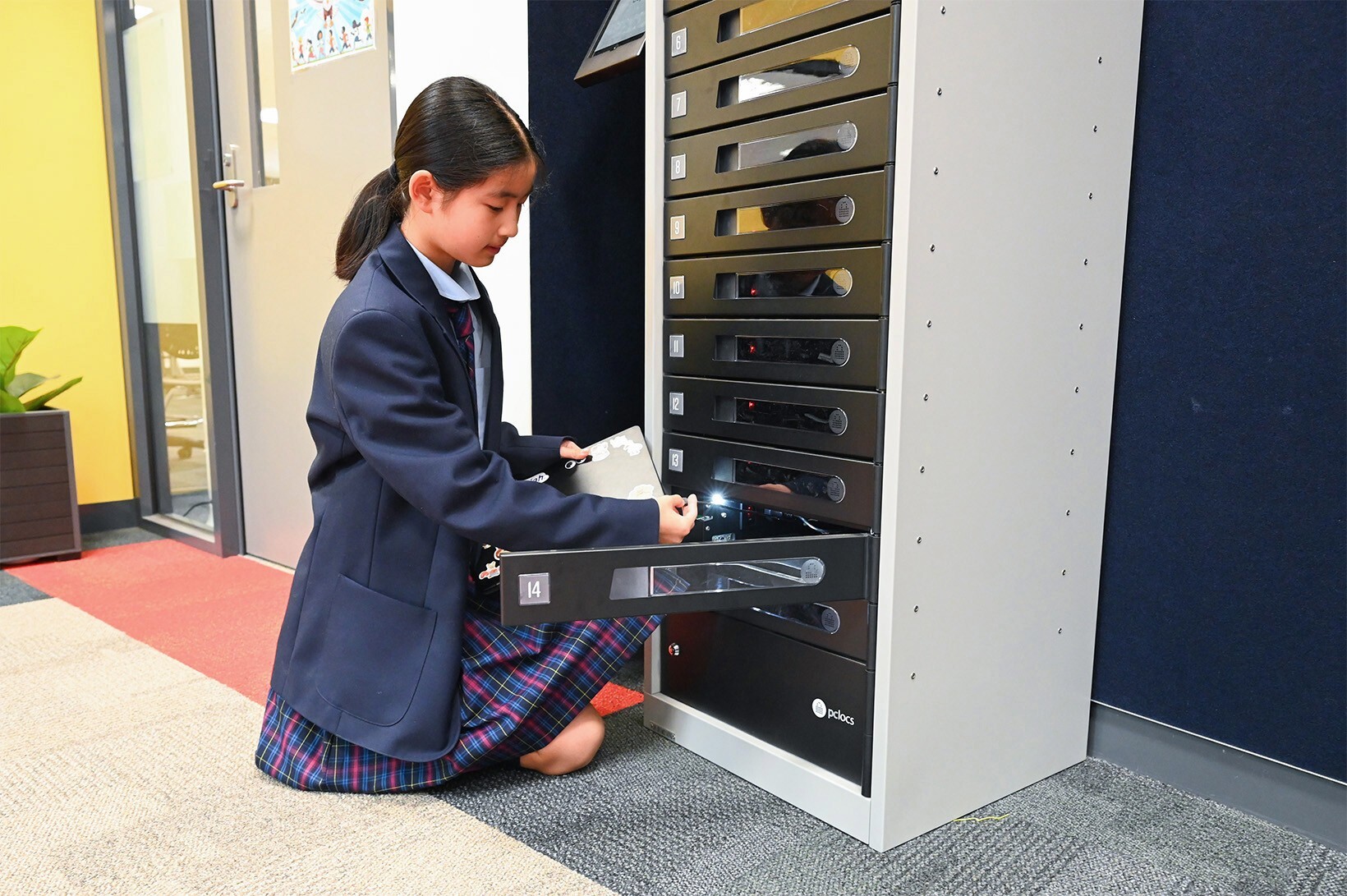
St Andrews introduced five ForwardPass Smart Locker towers to make charging a student-led part of the school day. A later upgrade to the Enhanced platform simplified access with touchscreen iPads and Microsoft SSO.
- Over 350 students use the lockers to keep laptops charged throughout the day.
- Students can charge securely near classrooms instead of relying on cables across classroom floors.
- Microsoft ID sign-in replaced the need to email 350 PIN codes each year.
- Teachers face fewer charging interruptions, while IT can remotely unlock a bay when help is needed.
Background: Keeping a 1:1 laptop program ready for class
Melbourne, Australia · Independent K–12 education · Secondary 1:1 laptop program
St Andrews Christian College is a leading independent K–12 school in Melbourne’s eastern suburbs.
Known for its academic excellence and forward-thinking facilities, the school transitioned its secondary students to a 1:1 laptop program three years ago — an ambitious rollout that came with one glaring issue: battery life.
In our conversation with Aaron Davis, Senior IT Technician, and Peter Friend, Marketing and Communications Manager, we explore how St Andrews Christian College overcame the challenges of device readiness with the help of ForwardPass.
The challenge: Charging laptops without disrupting lessons
Before smart lockers, device charging was a constant disruption. Prior to rolling out a 1:1 laptop program, the school relied on a BYOD program. Students were supposed to come to their classes with devices ready and powered up — but oftentimes, that was not the case.
Each student received a charger with their device, but it stayed at home. If a laptop ran flat, there wasn’t a built-in solution, so teachers often had to improvise with cables across classroom floors, introducing safety hazards and interruptions.
The IT team, meanwhile, was caught in a cycle of managing tech hiccups that otherwise could’ve been avoided:
"When a student ran out of charge, the only option was to plug in on the floor. It wasn’t safe, and it definitely wasn’t sustainable."
It was clear: the school needed a structured, scalable solution that didn’t rely on workarounds.
“Our students know the locker they used and that their laptop will be fully charged when they return. And if anything goes wrong, IT can remotely unlock a bay to help them out.”
St Andrews Christian College
The solution: Five charging towers and simpler student sign-in
When St Andrews Christian College introduced its 1:1 laptop program, they knew device readiness would make or break the experience. Each student having their own laptop helped reduce loss and confusion — but it didn’t solve the battery issue.
"We had to find a way to top up 300 devices during the school day — or they wouldn’t make it to period six."
With no existing infrastructure for on-campus charging, the IT team looked for a solution that could scale, support busy classrooms, and make students self-sufficient. As a proudly Australian-owned company with local support, ForwardPass stood out right away.
The school chose ForwardPass Smart Lockers as the foundation for its charging strategy — giving students a secure, reliable way to charge devices throughout the day without needing help from IT or teachers.
They installed five towers: three 15-bay units and two 5-bay units, located in high-traffic areas like corridors, homerooms, and library zones.
St Andrews later upgraded to the Enhanced platform, adding touchscreen iPads and Microsoft SSO. That eliminated PIN confusion and simplified logins:
"Instead of emailing 350 PIN codes every year, students now just log in with their Microsoft ID. It assigns a bay automatically and remembers their name when they return."
The results: Charged devices, fewer interruptions, and less hands-on support
Charging that fits around the school day
Over 350 students use the lockers first thing in the morning, between classes, or before an afternoon double period.
For teachers, it means fewer delays and fewer excuses. No more tripping over cords or rearranging a lesson plan around a flat battery. They simply send a student to a smart locker nearby, knowing the process is quick and straightforward.
The impact on IT has been just as clear. Aaron notes they’re spending less on chargers, since every student keeps theirs at home — and during school hours, the lockers run quietly in the background.
As for device loss? It’s largely a non-issue:
"Every student gets their charger at the start of the year, and it stays at home. If they lose it, that’s on them. But on campus, the smart lockers give them a reliable safety net."
And while the system rarely needs hands-on support, the IT team knows that the ForwardPass customer support team is always nearby:
"When something does go wrong, we usually get someone on the phone right away. They help us troubleshoot, and if a part’s needed, it’s shipped overnight. Most things are sorted the same day.”
Community impact: A visible part of the school experience
After seeing how the lockers made daily routines easier for students, teachers, and IT, it became clear they were more than just a utility — they were part of the school’s culture.
Peter described how the lockers contribute to the school’s branding and tour experience:
"ForwardPass lockers absolutely contribute to that impression. They look great, and when families come through on school tours, they actually see students using them in real time. It becomes a powerful discussion point."
At St Andrews, the towers don’t just serve a purpose; they send a message about what the school values: preparedness, professionalism, and putting students first:
"Parents see it as an added value. It shows that the college is always on a progressive path. There’s a strong aesthetic and visual component to these lockers, and our community really appreciates that."
Looking ahead: More charging capacity and connected support workflows
With enrolment rising and the college expanding, the team is already planning for more towers — and thinking beyond charging.
They’re also exploring how a configured connection with their help desk system could support loaner assignments, repairs, and technology deployments:
"The idea of tying lockers into our ticketing system for device swaps or repairs — that’s really promising. We’re excited to see where it goes."
Final word: An everyday tool for device readiness
At St Andrews Christian College, what began as a solution for keeping devices charged has grown into something much bigger. The lockers are dependable, durable, and backed by responsive local support — and they’ve become a quietly essential part of school life.
When asked if he had any advice for other schools using ForwardPass, Aaron didn’t hesitate:
"For existing customers, using upgrade to the kiosk is a really good option... It helps with workflows greatly."
For schools juggling device fleets, support requests, and student accountability, the value goes far beyond convenience.
ForwardPass is honoured to work with St Andrews Christian College — and proud to be part of something even more meaningful: a visible, day-to-day tool that reflects the school’s values and even supports their enrolment journey.