Access to laptops and tablets is essential for higher education students to complete coursework, use digital learning platforms, and participate in academic activities. Yet, persistent access and affordability barriers remain. For example, the University at Buffalo’s 2025 Student IT Experience Survey found that nearly half of students who do not use a laptop or tablet for coursework say cost is the main reason.
To bridge this divide and promote digital equity in education, universities are increasingly turning to loaner device programs. These initiatives provide students and staff with institution-owned technology when personal devices are unavailable, ensuring no one is left behind. This guide outlines strategies to design, operate, and refine a laptop loaner program — enhancing access while reducing administrative strain.
Key takeaways
- Because low-income students are less likely to own laptops, loaner programs remain one of the fastest and most effective tools universities can use to address inequities in digital access.
- Successful programs depend on coordinated efforts across departments. Consistent policy enforcement and efficient handling of exceptions — such as device damage or use during travel — are critical to maintaining trust and smooth operations.
- Automated reminders, structured return procedures, and detailed check-in logs minimise overdue devices. These measures free IT teams from repetitive manual tasks and follow-ups.
- Smart lockers for universities can support self-service device pickups and returns, reducing routine staff handling in loaner programs.
- In ForwardPass deployments, self-service smart lockers reduce the IT time required for routine device lending and management by about 75%–80%, helping institutions lower the labour cost associated with these workflows.
What is a loaner device?
A loaner device is a university-owned laptop, tablet, or phone that the university temporarily issues to a student, staff member, or researcher when their primary device is lost, under repair, or otherwise unavailable.
Many universities and colleges operate loaner programs to minimise learning disruptions, promote equitable access, and maintain academic continuity during device outages, fieldwork, or international travel.
What is a loan device?
A loan device is another term for a loaner device: university-owned technology temporarily issued to an approved user. In practice, the term often appears in operational contexts, where campus equipment loan software records assignments, tracks availability, and manages returns.
What does a loaner device mean in a university setting?
Universities manage loaner devices through structured workflows supported by help desk ticketing systems, online reservation portals, or smart lockers. Universities typically allocate devices based on academic or administrative needs, including faculty teaching, student research, or business device loans for faculty or external collaboration. Many loaner laptops and tablets are preconfigured for remote learning, supporting virtual labs, online coursework, and off-campus study.
What is a phone loaner device?
Although less common, phone loaners serve a crucial purpose. Universities often provide them to faculty or staff travelling abroad, especially in regions with heightened cybersecurity risks or restricted data access. These secure devices let users maintain reliable communication and protect institutional data while working internationally.
Why universities need a device loaner program
Universities need device loaner programs to give students temporary access to essential technology when their primary device is unavailable. A structured loaner laptop management program can reduce interruptions to coursework while giving IT a defined process for issuing, tracking, and recovering university-owned devices.
Several operational needs make loaner programs particularly important:
- Keep students learning. When a laptop breaks, is lost, or becomes temporarily unavailable, learning should not stop. A carefully managed student laptop loan program ensures uninterrupted access to the technology students depend on for coursework, research, and collaboration.
- Protect data and systems. Unlike personal devices that may lack proper security safeguards, university-issued loaner devices are meant to meet institutional standards. This protects sensitive information, reduces the risk of data breaches, and keeps academic systems uncompromised.
- Stay compliant. Universities can use documented loaner policies, access rules, and device records to support compliance with requirements such as the U.S. Family Educational Rights and Privacy Act (FERPA).
Core components of a tablet/laptop loaner program in a university
A university tablet or laptop loaner program typically includes request and reservation, device pickup, return, repair and maintenance, and inventory and loan management. Each component has clear ownership, rules, and records so staff can manage handoffs consistently.
Request & reservation
Request and reservation workflows define how students or staff request a loaner device, how eligibility is verified, and how the loan is recorded before checkout. They create a consistent process for moving an approved request into device issuance.
A typical request process includes:
- An online form or portal where students or staff can request a loaner and sign a loaner agreement.
- ID verification (student ID number, staff credentials) to confirm the borrower meets the program’s eligibility rules.
- An equipment checkout system that ensures each request is logged, validated, and traceable from start to finish.
Universities can also use eligibility rules, such as enrolment status, borrowing limits, or maximum loan duration, to handle routine requests consistently. Where the system supports automated approvals, these rules can reduce the number of requests that require manual review.
Pickups
Pickup is the handoff stage where approved borrowers receive university loaner laptops. A defined checkout process establishes who received the device and when it changed hands.
Universities typically use one or more pickup methods:
- Scheduled pickups arranged through calendar tools.
- Self-service pickups through smart lockers, where authorised users authenticate and collect assigned devices.
- Staff-managed distribution points for handoffs that require direct assistance or additional controls.
Returns
The return process records when a loaned device comes back to the university and whether it is ready to be issued again. It also helps IT identify overdue, damaged, or improperly returned devices.
Common return controls include:
- Defined return points, including service desks, drop-off locations, or self-service smart lockers.
- Recorded check-ins that update loan status and preserve return history.
- Due-date reminders and overdue alerts for borrowers and, where configured, administrators.
IT teams typically remove damaged or improperly connected devices from the loan pool until they inspect and clear them for reuse.
Repairs & maintenance
Repairs and maintenance keep loaner devices available, functional, and ready for reuse. Universities may handle common hardware and software issues on campus, use diagnostics to determine whether IT can complete repairs in-house, and send warranty-covered or specialized work to the manufacturer or authorised service provider. After repair, IT can inspect, test, and reconfigure the device before returning it to the loaner pool.
Inventory and device loan management
Inventory and device loan management tracks which devices are available, assigned, in use, or out of circulation. It helps IT maintain an accurate view of the loaner pool and understand how devices move through the program.
A loan management system can support inventory control by:
- Tracking device status and assignment across the loan pool.
- Maintaining device and loan history for each asset.
- Generating reports and exports for reviews, audits, and purchasing decisions.
Some universities also connect loaner records with a mobile device management (MDM) or endpoint management platform. Depending on the platform and configuration, IT may be able to view device status, apply security policies, or take remote actions on managed devices.
Overdue return management needs a defined response sequence: confirm the loan record and due date, send the configured reminder, assign unresolved returns to a staff owner, and reconcile the returned device with its asset record. Keep any MDM lock or wipe decision separate from notifications and subject to institutional policy. A reminder is not evidence that a device has been recovered.
Best practices to streamline pickups, returns, and repairs
Before scaling a campus loaner program, IT teams should establish repeatable processes for routine handoffs, policy enforcement, and device servicing. The goal is to handle higher transaction volumes without creating unnecessary manual follow-up or inconsistent device records.
Focus on these operational areas:
- A clear device lending policy. Define borrower responsibilities, loan periods, device replacement costs, and how lost or damaged devices are handled. For example, as of November 2026, Indiana University Bloomington states that an unreturned loaner laptop is considered lost, with a US$900 replacement fee for the laptop and US$50 for the charger.
- Automated reminders. Configure your help desk, reservation, or asset management system to send pickup instructions, return reminders, and overdue notifications.
- Repair triage. Establish a triage process to assess each repair and determine whether IT should handle it in-house or refer it to an OEM or authorised service provider.
- Staff training. Train staff on check-in and checkout procedures, lending policies, device records, and the systems used to manage handoffs.
Tools & technology to support device loan management
University device loaner programs typically rely on ticketing systems to manage requests, handoffs, and support records. Some universities also deploy smart lockers to move routine device pickups and returns to self-service.
Laptop loaner program software
Universities may use several types of laptop loaner program software, including ticketing systems, mobile device management (MDM), and asset tracking platforms. Ticketing systems handle requests and support workflows, while MDM and asset tracking tools help IT manage device configurations and inventory records.
Academic environments widely support ticketing systems. A 2026 Primary Research Group survey of 33 academic libraries found that 51.52% fully used ticketing systems and another 15.15% used them partially.
Smart lockers (ForwardPass)
Smart lockers are secure, connected cabinets that combine controlled device access with software for managing device handoffs, charging, and activity records. ForwardPass is a smart locker system built for self-service device operations in universities, schools, workplaces, and other organisations.
ForwardPass offers indoor smart lockers in 5-, 8-, 15-, and 23-bay configurations with Kiosk mounts available for 7th–9th generation or 10th–11th generation iPads.
Depending on the hardware generation and configuration, bays can provide AC power or up to 36W USB-C Power Delivery. Authentication options depend on the configuration and can include barcode, QR code, PIN, RFID, username and password, and single sign-on (SSO).
The ForwardPass Portal gives administrators a central interface to configure lockers, manage access, review activity, and monitor device workflows. Our portal can connect with ITSM, MDM, asset management, and identity systems through APIs and webhooks.
SSO can connect to compatible identity providers through SAML or OIDC, allowing universities to use existing institutional credentials for access. For more details on ForwardPass products, configurations, and workflows, see our smart locker FAQ.
The Portal supports five named workflows:
- Loaners for temporary device access
- Repairs for device drop-off and collection
- Replacements for permanent device swaps
- Deployments for assigned device distribution
- Charging for secure device charging
ForwardPass smart lockers are designed for self-service, so students can complete routine device handoffs without waiting in line at the help desk.
A typical self-serve process works as follows:
- Authenticate. The user verifies their identity at the locker.
- Select a workflow. The user chooses the required workflow.
- Access the bay. ForwardPass opens the appropriate bay.
- Complete the handoff. The user removes or returns the device and closes the bay.
- Record the transaction. ForwardPass automatically updates the loan record.
IT typically steps in only when an exception requires attention, such as preloading loaner devices into bays, collecting returned devices, or resolving issues that prevent a standard self-service handoff.
ROI of a university device loaner program
When IT or library staff manually issue, record, and recover loaner devices, each transaction adds staff work. Moving routine handoffs to self-service smart lockers can reduce that workload, and institutions can channel recovered hours into higher priority tasks.
For institutions with active lending programs, thousands of transactions can accumulate over an academic year. For example, the University of Arizona Libraries recorded 5,143 laptop loans in FY2025, alongside 19,089 total equipment loans.
At that scale, even a few minutes of staff handling per transaction can add up. An education-sector example from Kingsway Christian College, a K–12 institution, shows the operational burden: manual laptop loans took 3–5 minutes per transaction, with up to 25 loans handled per day.
After Kingsway Christian College introduced ForwardPass smart lockers, device transactions took less than one minute, reducing processing time by about 75% and saving IT more than one hour on busy days.
The U.S.-based ROI model below illustrates the potential financial impact for deployments with a similar annual loan volume and comparable IT involvement in device exchanges.
Its assumptions are (all dollar amounts are in USD):
- Annual loan volume: 5,143 laptop loans, based on the University of Arizona’s FY2025 laptop-loan volume
- Manual transaction time: 4 minutes per loan, using the midpoint of Kingsway’s reported 3–5-minute range
- Self-service transaction time: 1 minute per loan, using a conservative ceiling for Kingsway’s reported “less than one minute”
- Time reduction: 3 minutes per transaction, or 75%
- Annual manual labour: Approximately 343 hours (5,143 loans × 4 minutes ÷ 60 = 342.86 hours)
- Annual labour with smart lockers: Approximately 86 hours (5,143 loans × 1 minute ÷ 60 = 85.71 hours)
- Annual IT time saved: Approximately 257 hours (342.86 manual hours − 85.71 self-service hours = 257.15 hours)
- Labour rate: $30.24 per hour, based on the U.S. Bureau of Labor Statistics’ 2025 median hourly pay for computer support specialists
- Model period: Five years
- Labour-cost treatment: Constant hourly labour cost, with no wage inflation or benefits added
Disclaimer: This is an illustrative labour-savings model, not a ForwardPass product promise or a forecast for a specific university. Actual results will vary by institution, workflow, staffing model, loan volume, and deployment configuration.
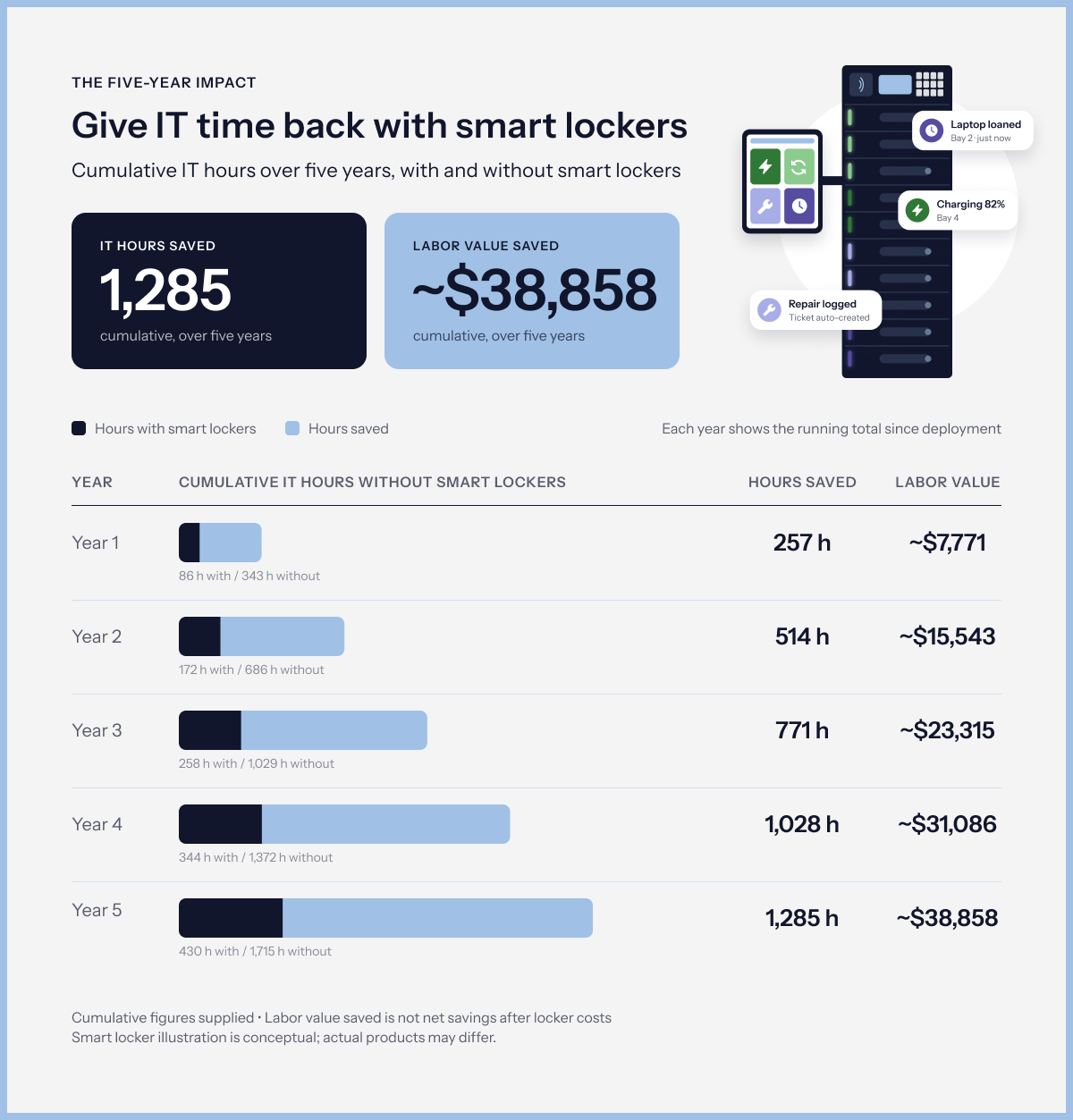
Under these assumptions, an institution processing about 5,143 laptop loans per year could recover approximately 1,285 staff hours over five years, representing about $38,858 in labour value before deployment costs.
The model above measures only the labour saved on individual loan transactions. In practice, smart lockers can also reduce the surrounding administrative work involved in keeping loaner devices available, accounted for, and ready for use.
This suggests that the deployment’s total labour impact may extend beyond the transaction-time savings captured in the loaner ROI model.
A university can calculate its own net ROI by replacing the example loan volume, transaction times, and labour rate with local figures, then comparing the resulting labour value with the total cost of the smart locker deployment, including smart locker installation costs.
Device loaner program implementation checklist
Universities deciding how to create a laptop loaner program should define policies, budget and staffing, pilot scope, communications, staff procedures, and ongoing monitoring before expanding campus-wide. A controlled pilot helps IT validate the operating model before committing resources to a broader rollout.
Use the following steps to guide implementation:
- Draft clear policies. Establish eligibility requirements, loan periods, damage/loss accountability, and return procedures. Include student-friendly FAQs and agreements.
- Secure budget and resources. Estimate device needs, replacement cycles, locker units, and IT staffing. Consider software licensing and locker integrations with ticketing or MDM platforms.
- Create a communications plan. Inform students and faculty about how the program works, where lockers are located, how to request devices, and who to contact for support.
- Pilot test at a small scale. Start with one building, department, student cohort, or device model before expanding across campus. Measure turnaround times, device demand, return compliance, and user experience to identify changes needed before a broader rollout.
- Train staff on workflows. Ensure all team members understand locker software, check-in/out procedures, and how to handle exceptions or escalations.
- Monitor usage and optimise. Use analytics from your locker system and ticketing tools to identify patterns, flag gaps, and refine inventory or staffing as needed.
Bottom line
A strong university device loaner program combines clear eligibility and return policies, accurate inventory records, repair procedures, and a consistent checkout process. Smart lockers can extend that model with self-service pickups and returns, reducing routine staff handling while preserving transaction records.
Loaner program ROI with smart lockers varies by deployment. ForwardPass customer deployments show reductions of about 75% to nearly 80% in routine device lending and management, depending on the workflow and operating model.
Book a Discovery to assess how ForwardPass could fit your loaner program.
FAQ
How do you create a laptop loaner program?
Create a laptop loaner program by defining eligibility, loan periods, return procedures, damage and loss rules, inventory requirements, and the systems used to manage requests and handoffs. Start with a limited pilot, measure device demand and turnaround times, train staff, and refine the process before expanding campus-wide.
What should a laptop loaner policy include?
A laptop loaner policy should define borrower eligibility and responsibilities, loan duration, return requirements, and what happens when a device is lost or damaged. It should also explain any replacement costs or other consequences so borrowers understand their obligations before accepting a device.
How long should loaner devices be issued for?
Loaner duration should match the university’s use case. Universities can set borrowing periods based on academic or administrative needs and use due dates, reminders, and overdue notifications to manage returns.
What’s the policy if a device is damaged?
If a loaner device is damaged, staff should record the issue and remove the device from circulation until IT determines whether it is ready for reuse. The university’s loaner equipment management policy should also define the borrower’s responsibilities and any applicable repair or replacement costs.
How should staff handle lost or stolen devices?
Staff should record the incident, update the device’s status, and follow the university’s established process. If the device is managed through an MDM or endpoint platform, IT may also be able to apply available security controls or remote actions, depending on the platform and configuration.
Can loaners be used for travel?
Yes. Universities can issue loaner devices for off-campus work and international travel, including situations where faculty or staff need a university-managed device while abroad. Before issuing the device, IT should apply the institution’s approved software, security settings, and access controls.
Can students or staff share a loaner device?
A loaner should remain assigned to the approved borrower for the duration of the recorded loan. If another student or staff member needs a device, the university should issue a separate loan to maintain a clear record of who received each device and when the handoff occurred.