A smart locker specification tells buyers whether the system can physically accommodate their devices, charge them appropriately, and support existing access methods. This glossary explains the core terms behind bay sizing, charging wattage, power options, and authentication so procurement and IT teams can compare smart locker systems on consistent technical criteria.
Key takeaways
- Bay dimensions determine device fit, while the bay count determines how many devices a locker can accommodate at one time.
- ForwardPass smart lockers are available in separate 5-, 8-, 15-, and 23-bay configurations, depending on the model.
- Higher charging wattage can reduce charging time only when the device supports that power level. If the charger can supply more power than the device accepts, the device will charge at its own maximum supported rate.
- Smart locker access depends on credential compatibility, so buyers should verify support for existing RFID, NFC, barcode, PIN, or identity-provider environments before deployment.
- Expandable systems typically add capacity by adding units to the deployment, rather than necessarily changing the number or size of bays inside an existing locker.
Smart locker bay sizes and configurations
Bay and compartment terminology describes the physical layout and capacity of a smart locker system. It helps buyers determine whether devices will fit, how many devices each locker can hold, and how the system can expand over time.
Read more: What is a smart locker? Learn how smart lockers use hardware, software, charging, and access controls to support device handoffs.
Bay
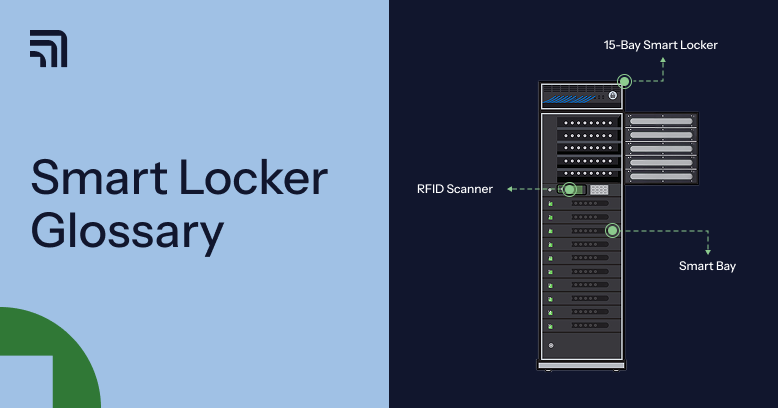
A bay is the individual storage space inside a smart locker where a device is placed for pickup, return, storage, or charging. Bay dimensions determine what devices can physically fit inside. Buyers should compare internal bay dimensions against the size of the devices they plan to store.
Tower (locker)
A tower (locker) is the complete smart locker unit that contains multiple bays. Locker specifications usually describe the overall physical footprint, while bay specifications describe the usable space available for each bay.
Bay configuration
A bay configuration is the number of individual bays built into a smart locker. In a device management locker, bay count affects how many devices one locker can accommodate. For example, the ForwardPass smart locker system is available in 5-, 8-, 15-, and 23-bay configurations, depending on the model.
Modular or expandable system
A modular or expandable smart locker system can increase capacity by adding more lockers to the same deployment. This allows organisations to add capacity for more users, sites, or buildings while managing the added lockers as part of one system. Expandable does not necessarily mean smart locker compartment sizes or the number of compartments inside an existing locker can be changed on request.
Read more: Need a broader procurement framework? Review these smart locker buying tips for guidance on authentication, integrations, scalability, total cost of ownership, vendor support, and pilot planning.
Smart locker power options and charging wattage
Charging terminology describes how a smart locker supplies power to devices and how much power each bay can provide. Buyers should use these terms to check whether a locker can support the charging requirements of their actual device fleet.
USB-C Power Delivery (PD)
USB-C Power Delivery (PD) is a USB charging standard that allows compatible devices and power sources to negotiate how much power is supplied over a USB-C connection. Supported power levels determine which devices a charging system can power effectively.
The USB Implementers Forum (USB-IF) states that USB PD supports power delivery up to 240W, with newer Extended Power Range levels adding 28V, 36V, and 48V operation beyond the earlier 100W limit.
This broad power range allows USB-C Power Delivery to charge many common consumer and workplace devices, from phones, tablets, and laptops to compatible handheld equipment and peripherals.
Charging wattage explained
Charging wattage is the rate at which electrical power can be supplied to a device, expressed in watts. Higher wattage can reduce charging time only when the connected device supports that level of power. If the device accepts less power, it will charge at its own maximum supported rate.
Charging wattage is one of the smart locker charging features buyers can compare across systems. ForwardPass smart lockers provide 36W USB-C Power Delivery in supported configurations for devices such as laptops, Chromebooks, tablets, iPads, and compatible rugged devices.
AC outlet or mains power
An AC outlet, or mains power outlet, supplies standard alternating-current power inside a locker bay so a device can use its own charger. This gives buyers another charging option for devices that do not rely on the locker’s built-in USB-C connection. For example, ForwardPass 5- and 15-bay smart locker models include 100–125 VAC outlets in each bay, allowing devices to charge with their own power adapters.
Perforated or ventilated bay construction
Perforated or passively ventilated bay construction uses openings in the locker structure to allow heat generated during charging to dissipate. This is important because charging multiple enclosed devices can create localised heat inside the locker. ForwardPass uses perforated construction in its smart locker units to support passive ventilation and heat dissipation during charging.
Active ventilation
Active ventilation uses powered airflow, such as fans, to move heat out of an enclosure. Buyers should distinguish it from passive ventilation because active systems use fans in addition to the ventilation openings needed for airflow.
Smart locker access methods explained
Smart locker access methods determine how a user proves their identity or authorisation before a bay opens. Procurement teams should confirm whether a smart locker vendor supports the authentication methods already used across the organisation’s identity and access environment.
RFID access
Radio-frequency identification (RFID) access uses a compatible card, badge, or tag to identify a user when it is presented to a smart locker’s RFID reader. For procurement teams researching smart locker vendors, the main consideration is whether the locker can read the RFID credentials already issued across the organisation.
Credential technologies may vary in RFID access locker configurations. Access-control systems commonly use 125 kHz low-frequency credentials or 13.56 MHz high-frequency credentials, or both, including contactless technologies based on standards such as ISO/IEC 14443 and ISO/IEC 15693.
ForwardPass supports several RFID credential types in compatible configurations, including MIFARE, HID Prox, and HID iCLASS. Its RFID locker system can work with both low-frequency and high-frequency credentials, depending on the hardware and credential format in use.
NFC access
Near-field communication (NFC) access is a specific type of high-frequency RFID that operates at 13.56 MHz and supports very short-range contactless communication. A smart locker that supports 13.56 MHz RFID does not automatically support every NFC credential, because compatibility depends on the reader’s supported standards and protocols. NFC implementations commonly use standards such as ISO/IEC 14443 and ISO/IEC 15693.
PIN code access
Personal identification number (PIN) code access uses a numeric code entered at the locker to verify a user before a bay opens. PIN access can work without issuing a physical credential, but it creates an account-management requirement around PIN creation and resets. Because a PIN can be shared or observed, organisations should also check how the smart locker system handles failed attempts, forgotten PINs, and credential changes.
QR code access
Quick Response (QR) code access uses a two-dimensional code that a smart locker scans to identify or authorise a user. QR codes can support digital credentials that are displayed on a phone or issued for temporary access. Unlike a traditional linear barcode, a QR code stores information in a square, two-dimensional pattern that can hold more data.
Barcode access
Barcode access uses a machine-readable linear code that a smart locker scanner reads to identify a user or credential. It can fit environments where employee or student ID cards already carry compatible barcodes. Traditional barcodes encode data in one dimension, giving them lower data capacity than QR codes.
SSO (Single Sign-On)
Single Sign-On (SSO) allows users to authenticate through an organisation’s existing identity system rather than maintaining a separate login. This can reduce the number of credentials users and administrators need to manage. ForwardPass, for example, supports multiple identity providers including Auth0, ClassLink, Entra ID, Google SAML, and Okta.
Read more: See how smart lockers work, from user authentication and bay access to device returns, charging, and activity records.
Username and password access
Username and password access requires a user to enter account credentials at the smart locker before a bay opens. It can fit organisations that already manage user accounts centrally but do not use single sign-on for locker access. Password-based access requires users to manage a separate credential, including password resets and account changes.
Biometric access
Biometric access verifies a user through a physical or behavioral characteristic, such as a fingerprint or facial pattern. For buyers of smart lockers, biometric access adds privacy, data-handling, and consent considerations that do not apply in the same way to cards, codes, or passwords.
Support for this method also varies by vendor, so procurement teams should confirm the biometric method and how biometric data is processed before treating it as a universally available access option.
Bottom line
Understanding the main smart locker terms makes it easier to compare systems based on device fit, charging, access, and capacity. These details help procurement teams assess whether a system fits their existing device fleet and identity environment.
ForwardPass also maintains a comprehensive smart locker systems FAQ that explains how the system works and gives procurement teams a broader reference point when evaluating requirements.
Book a Discovery to discuss how ForwardPass could fit your organisation.
Frequently asked questions
How do I know what bay size I need for a smart locker?
Choose a bay size that fits the largest devices the locker will regularly store or charge. Compare the locker’s internal bay dimensions with the dimensions of your laptops, tablets, rugged devices, or other equipment before procurement.
Does a higher charging wattage always mean faster charging?
No. Charging speed depends on both the power available from the locker and the maximum wattage the device can accept. A higher-rated charging port will not make a device charge faster than its supported input limit.
Can smart lockers use existing employee or student ID cards?
Yes, smart lockers can use existing employee or student ID cards when the locker reader supports the same credential technology and format. Procurement teams should confirm compatibility with the organisation’s current radio-frequency identification, near-field communication, barcode, or other card system before deployment.
What should buyers check before choosing a smart locker access method?
Buyers should check whether the access method works with the existing identity and credential systems. They should also confirm how users are added, how lost or changed credentials are handled, and whether the locker supports the required authentication method in the intended configuration.
Can a smart locker system expand after installation?
Yes, an expandable smart locker system can add capacity by adding more lockers to the same deployment. Expansion usually means managing additional distributed units within one system rather than changing the number or size of bays inside an existing locker.