The account is ready.
The device is ready.
The user is ready.
So why does IT still need to bring all three together?
For many IT teams, device provisioning is highly digital right up until the physical handoff. A user can be set up in advance. A spare device can be prepared and waiting. But getting that device into the right hands can still mean finding it, moving it, coordinating with someone onsite, and confirming pickup.
If you’re among the 40% of IT admins managing between 2,000 and 10,000 devices, those individual handoffs can add up quickly — especially when your team supports multiple locations.
ForwardPass Deployments helps IT teams put ready devices closer to the people who need them. Users collect an available device themselves, while IT controls access, monitors stock, and tracks the handoff in the ForwardPass Portal.
Why manual device deployments interrupt the IT day
Think about what happens when someone needs a device at another site.
First, IT needs to find a suitable spare. Then it needs to be prepared, transported or made available at the right location, and handed to the right person. Someone may need to coordinate a pickup time. Afterward, IT needs to know whether the device was actually collected.
Now picture a school with 2,400 students planning a Chromebook refresh. Alongside preparing new equipment, the team needs to organize distribution, record who receives each device, and coordinate a separate process for collecting and retiring old equipment.
The same pressures appear in smaller, recurring requests:
- New starters: A student joins mid-semester or an employee needs equipment for their first day.
- Device preparation: IT needs to charge devices, apply software and policies, and record the relevant asset information.
- Transport and handoff: A technician or onsite colleague needs to make the device available and confirm collection.
- Spare-pool management: Devices may be available centrally while another site runs low.
- Manual tracking: Spreadsheets, emails, and follow-up messages become part of every handoff.
None of these tasks is especially complicated on its own. Repeated across buildings, campuses, and offices, they pull IT away from other work and leave users waiting for someone else’s schedule.
Positioning prepared devices where they’re likely to be needed makes the final handoff easier to manage.
What is self-service device deployment with ForwardPass?
ForwardPass Deployments is a workflow for issuing prepared devices from a pool through smart lockers. IT makes suitable devices available, sets who can collect them, and tracks the completed pickup in the Portal.
Powered by ForwardPass Enhanced software, the self-service Kiosk, and the management Portal, the workflow connects physical collection with a record of the user, device, location, and pickup time.
Your team continues to prepare devices through its existing laptop deployment process, including provisioning, software installation, and security policies. ForwardPass handles access to that prepared stock and records the final handoff.
How the ForwardPass Deployments workflow works
The process starts with prepared devices and clear access rules. Once stock is loaded and users are authorized, they follow a guided pickup process at the Kiosk.
1. Prepare and organize your spare-device pools
Set aside interchangeable devices that are suitable for the users who will collect them. Staff laptops and student Chromebooks, for example, may need separate deployment workflows and pools.
Size the spare fleet around demand, replenishment time, and planned rollouts. For illustration, a 2,400-device fleet with a 10% spare allocation would have 240 spare devices. Your organization’s requirements will determine the right number, and the full spare fleet can be larger than the stock loaded in lockers at any one time.
Provision devices through your usual IT tools before making them available for collection.
2. Set up the workflow and load devices
Create a deployment workflow in the Portal, configure its notification preferences, and allocate it to bays at the Kiosk.
Register device IDs as you load, or import a CSV beforehand with model and serial details. At the Kiosk, scan or enter each device ID, place the prepared device in its bay, and save.
Loading connects the device with its workflow and station and makes it available for pickup. Registered spares that haven’t been loaded remain distinct from devices available at a station.
3. Authorize who can collect and where
For individually approved pickups, select the workflow and named user in the Portal. Restrict collection to a specific site or station group, or allow collection from locations offering that workflow.
Alternatively, enable self-service for eligible user groups. With user provisioning configured, those groups can collect from their designated pool without a separate approval for every person.
IT authorizes access to a pool. The specific device is selected when the user collects.
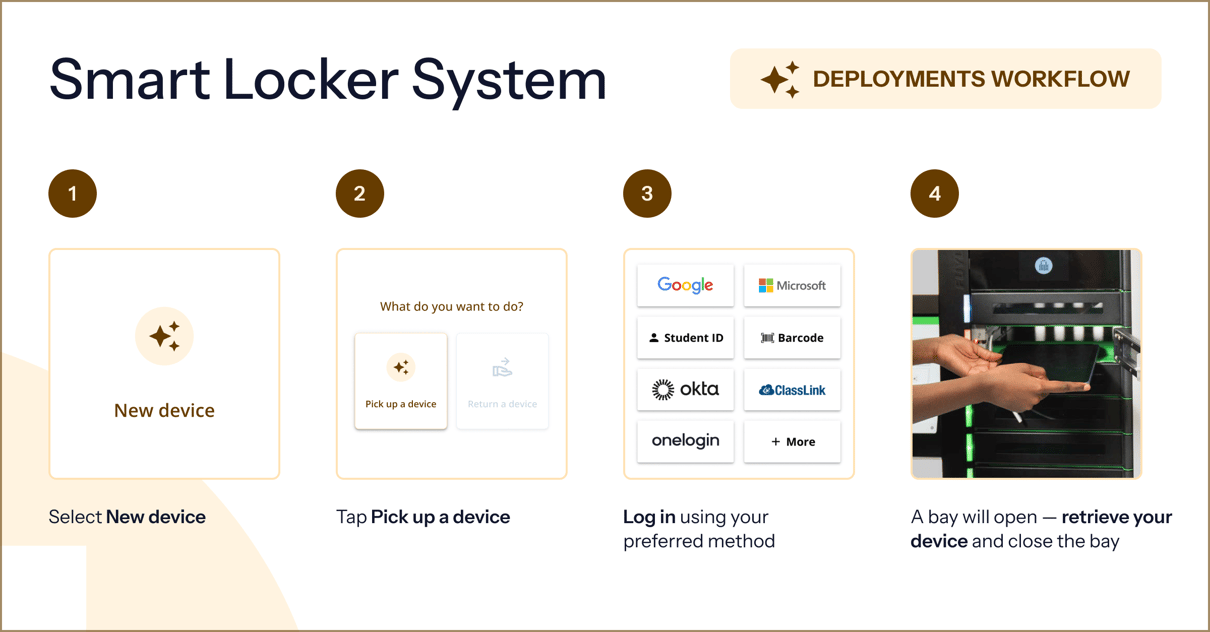
4. Let the user collect at the Kiosk
The user selects “New device” and authenticates using a supported method configured by your organization, such as SSO, an RFID badge, or a barcode.
ForwardPass checks authorization and opens a bay containing an available device. The system selects the available device that has been waiting longest, helping rotate stock.
The user takes the device and closes the bay to complete collection. The pickup record connects that user with the device issued.
5. Track pickup and replenish stock
Check the Deployments view to see which requests are pending pickup, which devices have been collected, and which requests have been withdrawn.
Monitor device availability across sites and station groups, then prepare and load additional stock where it’s needed.
The team keeps responsibility for device preparation, replenishment, and exceptions. Routine pickup can happen independently once stock and access are ready.
Key benefits of self-service device deployment
The value extends beyond opening a locker bay. ForwardPass helps IT manage the access, inventory, and pickup visibility behind each deployment.
Put spare devices closer to demand
A spare device only helps when it can reach the person who needs it.
Pre-positioning devices across schools, campus buildings, or offices means a suitable device can already be waiting when a request comes in.
Instead of finding and moving a device for every request, IT can authorize access to prepared stock at an appropriate location.
Reduce manual handoffs and onsite visits
Once a device is provisioned, loaded, and available, the user can complete pickup without an IT team member handing it over.
That means fewer collection appointments to coordinate and less reliance on someone being physically present at every site.
IT can manage named approvals remotely, while eligible groups can self-serve according to the workflow’s settings.
Keep self-service under IT control
Different situations call for different approval rules.
You may want to approve each new employee individually while allowing an eligible student group to collect from a dedicated pool. Separate workflows let you organize access around those needs.
For administrator-approved deployments, collection can also be limited to a particular site or station group. IT determines the collection options without choosing a bay for each user.
Monitor stock and act before a pool runs out
The Station Groups view shows available devices and the bays assigned to each deployment workflow across sites and groups.
Stock appears as Sufficient, Low, or Empty. Set a low-stock threshold as a percentage of the assigned bays and enable email alerts for the administrators responsible for replenishment.
Your team gets a clearer signal to restock before the next person arrives.
Manage changing plans remotely
A pickup may no longer be needed, or a request may need to change.
IT can withdraw a deployment while it is pending pickup, removing that outstanding authorization without visiting the locker. If the user still needs a device under different collection arrangements, IT can authorize a new deployment.
That keeps pending requests aligned with what users actually need.
Track deployment records, pickup status, and device assignments
Approving access and completing a pickup are different steps. ForwardPass gives IT a view of outstanding requests and a record of completed handoffs.
The specific device is linked to the user at pickup, so IT can identify the equipment issued without choosing its serial number in advance.
Records are searchable, filterable by site, group, workflow, and user, and exportable for reporting or audit reviews. Your team can follow up on outstanding pickups, review device assignments, and answer questions about who collected what and when.
Device deployment across schools, campuses, and workplaces
The workflow supports both planned distribution and recurring requests. The practical approach stays consistent: prepare suitable stock, position it near demand, authorize access, and record pickup.
Support students joining during the year
New students don’t always arrive on a predictable schedule. If 10 to 20 students join mid-semester, individual device handoffs can quickly interrupt a small IT team’s day.
Keeping prepared Chromebooks or laptops at the relevant school gives the team a ready pool to issue from. Once each student has the required account and pickup authorization, they can collect through the Kiosk.
IT retains a record of the device issued and when it was collected.
Make new employee equipment easier to collect
Position a prepared device pool near an employee arrival point, such as HR, or at the office where the employee will work.
IT can authorize collection remotely. Once the employee has the necessary credentials and access, they can collect without arranging a separate IT handoff.
For organizations supporting several offices, this gives new starters a consistent pickup experience while IT monitors stock and collection centrally.
Plan Chromebook distribution and device refreshes
Prepared device pools can support larger distributions when pickup waves are planned around locker capacity and replenishment.
IT can import inventory, load the relevant devices, and configure individual approvals or eligible-group self-service to suit the rollout.
The deployment workflow issues prepared devices. Collection of old equipment, retirement, and any associated data-handling requirements need their own coordinated process.
Keep devices available between IT visits
Some schools, campuses, and offices don’t have a technician onsite every day.
Stocking suitable devices ahead of demand lets IT authorize pickup and check availability between visits. Users can collect independently once access is ready.
IT still plans replenishment and handles exceptions, with fewer individual handoffs to coordinate across locations.
Questions about the ForwardPass Deployments workflow
Before introducing self-service pickup, it helps to understand where deployment fits within your existing provisioning and device-management processes.
Does ForwardPass provision or configure the device?
Your team uses its existing tools to prepare devices, install applications, and apply security policies. ForwardPass manages access to prepared stock and records the physical pickup at the end of that process.
Can a user collect one specifically assigned device?
Deployments authorizes collection from a pool of interchangeable devices. ForwardPass selects an available device at pickup and records its ID against the user. If someone needs one specifically prepared unit, discuss the appropriate pickup workflow with our team.
Can users collect without individual IT approval?
Yes, when group self-service is enabled and eligibility is configured. Alternatively, keep self-service disabled and authorize each named user’s pickup through the Portal. Group restrictions require user provisioning.
How is deployment different from a device loan or replacement?
Deployment issues a device without a borrowing period or expected return within that workflow. A loan workflow manages temporary use and return.
If the process also needs to collect an old or broken device as part of a permanent swap, use the appropriate replacement or linked workflow.