
Updated November 22, 2026
Device downtime in schools is the time a student or staff member is without a working, charged school device. Schools reduce it by shortening delays around reporting, handoff, loaner access, repair, replacement, and return — not by focusing on bench repair alone.
Device access is now routine across K–12. CoSN’s 2026 U.S. State of EdTech report, based on 607 responses, found 1:1 access in 90% of middle schools and 88% of high schools. At the same time, 38% of districts expect reduced device funding, making student device downtime both an instructional and operational problem.
Key takeaways
- Device downtime includes every delay between a device becoming unusable and a working device reaching the student again.
- The longest avoidable delays often happen before and after repair: reporting, handoff, loaner pickup, and return.
- Labor and lost instructional time can cost more than damaged parts because each incident creates repeated coordination work.
- ForwardPass uses distinct workflows — Loaners, Repairs, Replacements, Charging, and Deployments — for different device handoff scenarios.
- At Hudsonville High School, the time spent reviewing loaner devices fell from 30–45 minutes to about five minutes after the school moved loaner access into ForwardPass Smart Lockers.
What is device downtime in schools?
Device downtime is the total time a student or staff member is without a working, charged school-issued device. It starts when the device becomes unusable and ends when a working device is available again.
It can affect Chromebooks, tablets, laptops, and other devices used in a 1:1 device program, where each student has individual access to a device. According to EdTech Magazine (2026), device failure rates start to increase after three to five years as school device fleets age. The same source identifies four stages of device downtime:
- A fault or missing device is not reported immediately.
- The device or issue must be handed to IT.
- IT repairs and replaces the device, or arranges service.
- The repaired device or replacement must get back to the student.
This differs from a network outage, which affects connectivity rather than the physical device. Device downtime can contribute to learning downtime, which is the instructional time lost because the student cannot access the device or digital resources required for the lesson.
The challenge of device downtime
Learning outcomes are greatly affected when a student or teacher doesn’t have a working device in hand for instruction, class participation, or homework. When an electronic device used for learning breaks or has any other downtime issues, the student is quite literally locked out of their learning resources — plus, there are other classroom implications when devices aren’t available.
In fact, a November 2022 survey by LocknCharge (now ForwardPass), published through PR Newswire in August 2023, states 57% of 171 U.S.-based teachers surveyed reported helping replace student devices at least once per week on average, taking time away from teaching. In addition, 63% of surveyed teachers cited lost learning time for students who didn’t have access to a working device for class.
Lost learning time for students
A broken device becomes an instructional problem when the student cannot quickly move to a working device. The disruption can last longer than the repair if the student must wait to report the problem, visit IT, collect a loaner device, or return later for the repaired device.
A loaner device is a temporary replacement that a student uses until the assigned device becomes available again. Providing the loaner quickly separates learning continuity from the repair timeline.
Teacher time spent on swaps instead of teaching
Teachers often become the first support point when a device fails during class. That turns a technical incident into a classroom interruption because the teacher must decide what the student should do, find a spare, or direct the student to another location.
Reducing that dependency gives students a defined route to device support. It also keeps routine device handoff work from becoming part of the teacher’s lesson.
Repair bottlenecks for IT teams
Repair queues extend downtime when physical handoffs and ticket resolution are slow. Incident IQ data cited in a 2024 SmartBrief article covered 1,775 school districts serving more than 11.1 million students.
According to Patrick Bennett, then vice president of customer success at Incident IQ, those districts recorded an average ticket-resolution time of 11 days during the 2023–24 school year. That figure shows why schools should measure both repair turnaround and the time students spend waiting for another working device.
What causes device downtime in schools?
School device downtime usually comes from damaged devices, forgotten devices, low batteries, loss, repair backlogs, and manual handoffs. The physical repair is only one part of the delay because the surrounding process determines when a student gets a functional device.
The scale of repair demand can be substantial. North Carolina Department of Public Instruction’s 2026 break/fix reporting, reported in October 2026 by WFAE, found that 17.8% of student laptops required repair and about 60% of computer repairs were outside warranty.
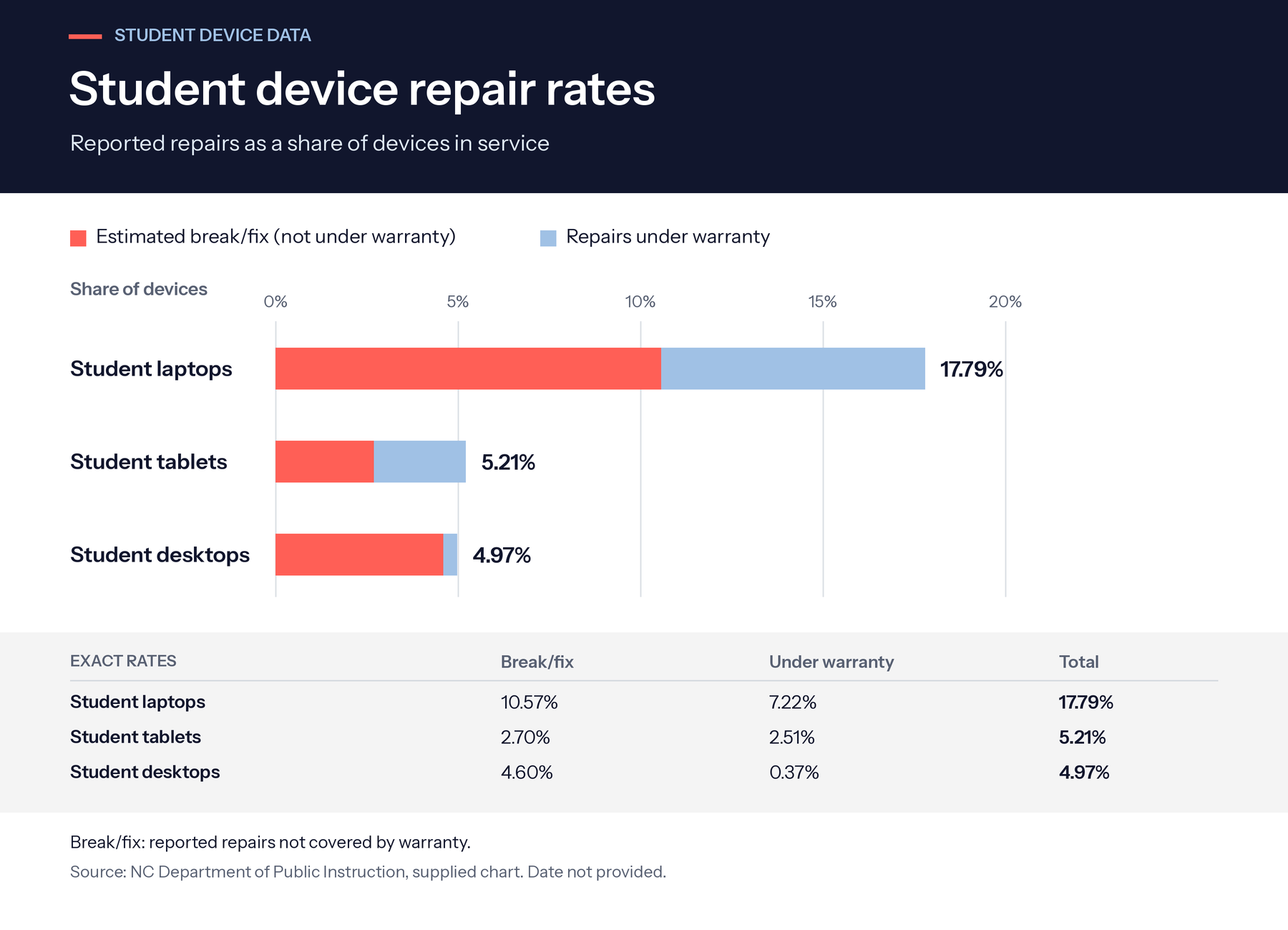
Source: North Carolina Department of Public Instruction, as reported by WFAE/WUNC News, October 1, 2026.
|
Cause |
What it looks like |
Typical delay |
Practical response |
|---|---|---|---|
|
Broken or damaged device |
Cracked screen, failed keyboard, or device that will not start |
Depends on diagnosis, parts, and repair capacity |
Issue a temporary loaner and record the repair intake |
|
Forgotten at home |
Student arrives without the assigned device |
Potentially the school day |
Provide a day loaner through a defined loan process |
|
Not charged |
Battery fails during a lesson |
One or more class periods |
Provide secure charging or a charged temporary device |
|
Lost or stolen |
Student has no device to return |
Until replacement is approved and issued |
Use a controlled replacement process with a handoff record |
|
Repair backlog |
Devices wait for diagnosis, parts, or technician time |
Can extend beyond bench repair time |
Prioritize repairs and maintain enough working spares for current demand |
|
Manual handoffs |
Emails, office visits, scheduling, or travel between sites |
Adds staff-dependent waiting to each exchange |
Move routine pickup and drop-off closer to the user |
Forgotten devices are especially relevant to take-home device programs because the device moves between school and home every day. A defined loan process prevents a forgotten Chromebook from becoming a full day without access.
How much does device downtime cost a school?
Device downtime costs include staff labor, lost instructional time, repair or replacement spending, and the cost of maintaining spare devices. Hardware costs alone can be substantial.
For example, according to Government Technology (2022), Atlanta Public Schools approved $3.5 million in one-time funding to replace damaged and unreturned devices after reporting that 4,762 devices remained unreturned.
While hardware invoices are visible, repeated staff handling and student waiting time are harder to measure. A full device cost model should account for labor involved in issuing a loaner, coordinating service, and returning the repaired device. Districts can calculate the operational cost of device downtime using data they already collect.
|
Input |
Where to find it |
|---|---|
|
Device incidents per week |
Help desk or repair tickets |
|
Staff minutes per incident |
Time a sample of intake, loaner, and return transactions |
|
Staff hourly cost |
Finance or payroll |
|
Student time without a working device |
Ticket timestamps and loaner records |
|
Spare and replacement purchases |
Purchasing records |
A simple weekly labor formula is:
Weekly staff cost = incidents × staff minutes ÷ 60 × hourly labor cost
For example, 40 incidents requiring 15 minutes of staff handling at $30 per hour equal $300 in weekly staff handling time. The same district can estimate weekly learning time lost by multiplying incidents by the average number of student hours without a working device.
This calculation separates device cost from process cost. It also gives technology leaders a basis for comparing student device replacement costs with the recurring labor needed to handle each incident.
How to reduce device downtime in schools
Schools reduce device downtime in schools most effectively by shortening each stage between the initial problem and access to another working device. The goal is to minimize the time it takes to provide a working device.
1. Measure time to a working device
Track when the problem is reported and when the student receives a usable device. This practical metric captures the complete interruption, while repair turnaround measures only the time spent fixing the original unit.
Compare both measures by school, device type, and issue category: a long gap between reporting and loaner pickup points to a different problem than a long bench repair.
2. Keep a right-sized spare device pool
A spare device pool is the reserve of working devices available when assigned devices are unavailable. A commonly cited rule of thumb is to maintain spare devices equivalent to 10–15% of the deployed fleet, although this is an anecdotal estimate rather than an established industry benchmark.
Schools should size their pool based on local incident volume, peak demand, and repair turnaround. A structured loaner laptop program for K-12 should also define who can borrow a device, how long it can remain out, and what happens when it becomes overdue.
3. Let students collect loaners without waiting for staff
Where policy and age group allow it, self-serve pickup removes the need for a librarian, teacher, or technician to perform every physical handoff. ForwardPass Loaners can record the user, device, checkout, return status, and overdue status while the student collects a temporary device.
For example, the Brasher Falls case study reported that daily device-management time fell from up to 2.5 hours to about 30 minutes after the district introduced ForwardPass smart lockers for routine device access.
4. Make repair intake a defined handoff
A repair workflow should capture the device, the reported issue, and the user before the device enters the repair queue. ForwardPass Repairs supports self-serve drop-off and, depending on the configured integration, a webhook or connected ticketing system can create or update the associated repair record.
However, this does not make parts arrive faster or shorten bench work. It removes avoidable waiting around intake and collection, which is why K-12 device repair best practices should distinguish repair time from handoff time.
5. Give forgotten and uncharged devices different fixes
A forgotten Chromebook needs temporary device access, while an uncharged Chromebook may only need secure access to power. Treating them as different problems prevents schools from applying the same workflow to every interruption.
ForwardPass Loaners supports temporary replacement access. ForwardPass Charging provides secure charging sessions, with 36W USB-C Power Delivery in every bay across the 5-, 8-, 15-, and 23-bay models. The 5- and 15-bay models also include AC outlets.
6. Plan for predictable peaks
Testing periods, the start of term, and aging fleets can increase demand for repairs and temporary devices. Schools can reduce preventable failures through bulk checks, updates, hardware triage, and spare preparation before those peaks.
Once devices are prepared, ForwardPass Deployments can support organized self-serve distribution. Deployment does not perform device maintenance; it shortens the physical collection stage after devices are ready.
7. Review handoff data every month
Monthly review should identify repeat failures, overdue loaners, high-volume locations, and long intervals between the initial report and working-device access. Those patterns show whether the main constraint is repair capacity, insufficient spare inventory, or the handoff process.
Device lifecycle management for K-12 IT teams becomes more useful when these transaction records inform repair, replacement, and refresh decisions rather than remaining in separate systems.
How three districts cut device downtime
Moore Public Schools, Los Angeles Unified School District, and Beaverton School District used ForwardPass smart lockers to address different device-access problems, from remote exchanges to charging and backup-device availability.
|
District |
Size |
Downtime problem |
What changed |
Result |
|---|---|---|---|---|
|
Moore Public Schools, Oklahoma |
36 sites across about 136 square miles |
Delivering a device to a student or teacher could require a 30-minute drive |
The district piloted smart lockers connected with Incident IQ to support remote device handoffs |
Students could access devices without requiring IT to make every physical delivery |
|
Los Angeles Unified School District, California |
Large multi-campus district |
Lost, forgotten, and broken devices interrupted classroom access |
The district planned to add up to 1,800 smart lockers for device distribution and exchange |
Lockers provided students and educators with another way to access ready-to-use devices when assigned devices were unavailable |
|
Beaverton School District, Oregon |
More than 60,000 students |
Students needed access to charging and backup devices when assigned devices were unavailable |
The district deployed 10 smart lockers for device exchange, overnight charging, storage, and backup-device checkout |
The lockers gave students additional access to charged and backup devices |
More recent customer results show the same pattern with measured IT time. Bosqueville ISD results report that its two-person technology team estimates five ForwardPass Smart Lockers save 25–30 staff hours per week across repairs, loaners, and charging.
Where smart lockers fit in a downtime plan
Smart charging lockers can shorten staff-dependent handoff stages around a device problem, including repair drop-off, loaner pickup, replacement, charging, and return. They do not shorten bench repair time or parts lead times, so they work best as infrastructure for a broader device-support process.
ForwardPass Smart Lockers use separate workflows for different device events. Depending on the configuration, the system can also connect handoff records with identity, ticketing, or asset systems.
|
Downtime stage |
Manual process |
With ForwardPass |
|---|---|---|
|
Fault reporting and repair drop-off |
Student waits for IT availability |
Repairs provides a guided self-serve drop-off and records the transaction |
|
Temporary device access |
Staff locates and issues a spare |
Loaners provides controlled self-serve checkout and return |
|
Permanent device exchange |
Staff coordinates return and replacement |
Replacements records the failed-device handoff and replacement |
|
Uncharged device |
Student searches for an outlet or staff-managed charger |
Charging provides a secure charging session |
|
Prepared-device collection |
IT schedules distribution |
Deployments provides a recorded self-serve pickup |
The result is a clearer chain of custody for each physical handoff. IT can see who collected or returned a device and when, while users have a defined place to complete the transaction.
IT teams evaluating smart lockers for K-12 schools should assess the workflows, authentication options, integrations, capacity, and charging requirements that fit their environment.
Comparing locker systems? Take the Smart Locker Buying Guide checklist to your next vendor demo.

Final thoughts
Reducing device downtime starts with measuring the whole interruption rather than the repair bench alone. Schools should focus first on the delays they can control:
- Measure time from the initial problem to access to a working device.
- Maintain enough working spares for actual demand and repair turnaround.
- Reduce staff-dependent handoffs where self-service device exchange is appropriate.
If device exchanges are consuming IT time or keeping students away from working devices, Book a Discovery to review how ForwardPass could fit your district’s current support process.
FAQ
What causes Chromebook downtime in school districts?
Chromebook downtime usually comes from damage, low batteries, forgotten or lost devices, repair queues, and delays in getting devices to and from IT. The practical target is the total time to a working device, not repair time alone.
How long does it take to repair a school device?
There is no universal device repair turnaround time because damage, parts availability, staffing, and service models vary. Districts should measure bench repair separately from the time required to report the problem, provide a loaner, and return the repaired device.
How many spare devices should a school keep?
A commonly cited rule of thumb is to maintain a spare device pool equivalent to 10–15% of the deployed fleet, although this is a planning estimate rather than a universal industry benchmark. Schools should adjust this figure based on weekly incident volume, peak loaner demand, expected repair turnaround, and the number of students who cannot continue learning without a device.
How do you calculate the cost of device downtime?
Start with the number of incidents, staff handling time, labor cost, student hours without a working device, and annual spare or replacement spending. Separating labor and learning time from hardware cost shows whether the largest expense is the device or the process around it.
How do smart lockers reduce student device downtime?
Smart lockers reduce downtime by shortening physical device handoffs through self-serve access. ForwardPass supports this through five distinct workflows: Loaners, Repairs, Replacements, Deployments, and Charging. These workflows reduce delays in device exchange and pickup, but do not shorten the time required to diagnose faults, obtain parts, or complete physical repairs.